
What is a License Plate Projector
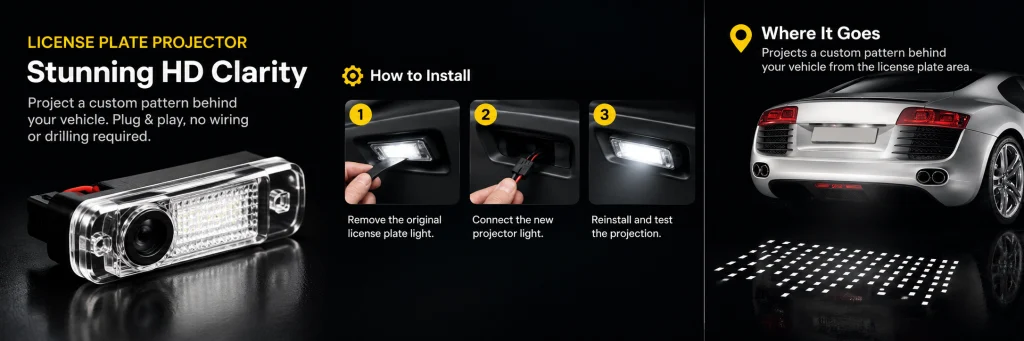
A license plate projector replaces the factory license plate light and projects a crisp pattern onto the ground behind your vehicle. Our vehicle-specific projectors use the original mounting position and factory connector for a clean, plug-and-play installation.
No drilling. No wiring modifications. Installation takes just a few minutes on most compatible vehicles.
Before Installation
Make sure your projector is compatible with your vehicle before installation.
You’ll need:
- License plate projector
- Plastic trim removal tool
We recommend testing the projector before snapping it into the factory housing.
Step 1 — Remove the Factory License Plate Light
Locate the factory license plate light at the rear of the vehicle.
Insert a plastic trim tool at the retaining-clip side and gently release the factory light from its housing.
Avoid using excessive force or pulling on the wiring.
Step 2 — Disconnect the Factory Light
Pull the factory light out far enough to access the connector.
Press the connector release tab and disconnect the original light.
Hold the connector itself—do not pull directly on the wires.
Step 3 — Connect the New Projector
Connect the license plate projector directly to the factory connector.
No additional wiring is required for compatible plug-and-play models.
Make sure the connector is fully seated.
Step 4 — Test Before Installation
Before installing the projector into the housing, test it first.
Unlock the vehicle or activate the lighting system and check that:
- The projector turns on
- The image is clear
- The projection is facing the correct direction
If the image is upside down or reversed, correct the projector orientation before installation.
Step 5 — Install the Projector
Carefully tuck the connector and wiring back into the factory housing.
Align the projector with the original opening and gently press it into place until it is secure.
The projector should sit cleanly and flush with the surrounding trim.
Step 6 — Final Test
Test the projector again after installation.
Depending on the vehicle and projector model, the projection may activate when the vehicle is unlocked, remain illuminated while driving, and switch off automatically when the vehicle is locked.
Installation Complete
That’s it—your license plate projector is ready to use.
For a compatible vehicle, the entire installation uses the factory mounting position and original electrical connector, with no drilling or permanent modification required.
Having Trouble?
If the projector doesn’t turn on, check that the connector is fully seated and test it again before reinstalling.
If the image is upside down or reversed, remove the projector and correct its orientation.
If the housing doesn’t fit, do not force it. Recheck the vehicle compatibility listed on your product page.
Looking for a License Plate Projector?
Our vehicle-specific License Plate Ground Projectors are designed to replace the factory license plate light with a plug-and-play installation and HD ground projection.
-
 Sale↗Audi
Audi HD Static License Plate Ground Projector — Set of 1
Original price was: $99.00.$49.00Current price is: $49.00. -
 ↗BMW
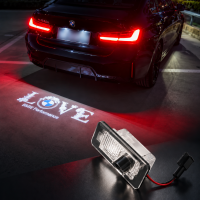
↗BMWBMW License Plate Ground Projector — Plug & Play, Set of 1
-
 Sale↗Tesla
Tesla HD Static License Plate Ground Projector — Set of 1
Original price was: $99.00.$49.00Current price is: $49.00.